Web Services and RESTful APIs
Software Engineering
(for Intelligent Distributed Systems)
A.Y. 2025/2026
Giovanni Ciatto
Compiled on: 2026-07-31 — printable version
What is the Web?
The Web is, at the same time:
- a distributed hypermedia information system
- a collection of linked resources accessible via the Internet (in particular, via HTTP)
- an infrastructure for distributed systems based on HTTP
In practice, the Web revolves around:
- resources identified by URLs
- interactions mediated by HTTP
- documents and applications built with HTML, CSS, and JavaScript
- hyperlinks connecting information and behaviour
Hyper-links, hyper-text, and hyper-media
- hyper-links are references from one resource to another, enabling navigation and discovery
- hyper-text is text that contains links to other text
- hyper-media generalizes the concept to include links in images, audio, video, forms, etc.
- the Web’s success is largely due to its ability to connect resources through links
- in the user’s perspective, the Web is something to navigate and explore through links…
- … not just a collection of isolated documents
URLs identify resources
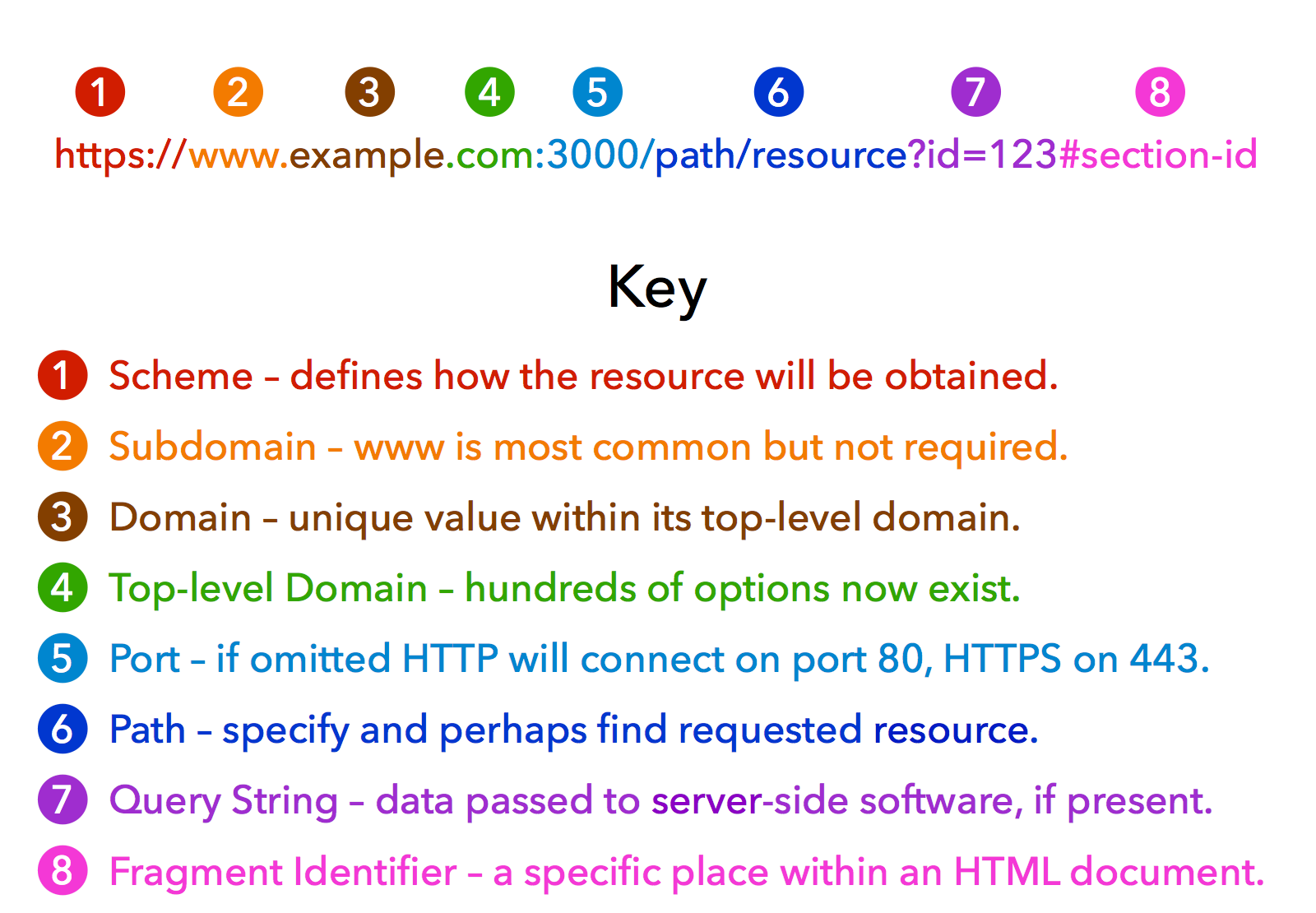
- a URL tells the client where a resource is and how to reach it
- different parts of the URL may identify host, port, path, query parameters, or fragment
- in ReSTful systems, URLs should identify resources rather than actions
- e.g. WRONG URL:
https://example.com/getCustomer?id=123 - e.g. RIGHT URL:
https://example.com/customers/123
- e.g. WRONG URL:
HTTP is the Web’s application protocol
Hyper-Text Transfer Protocol (HTTP) standardizes how clients and servers exchange messages:
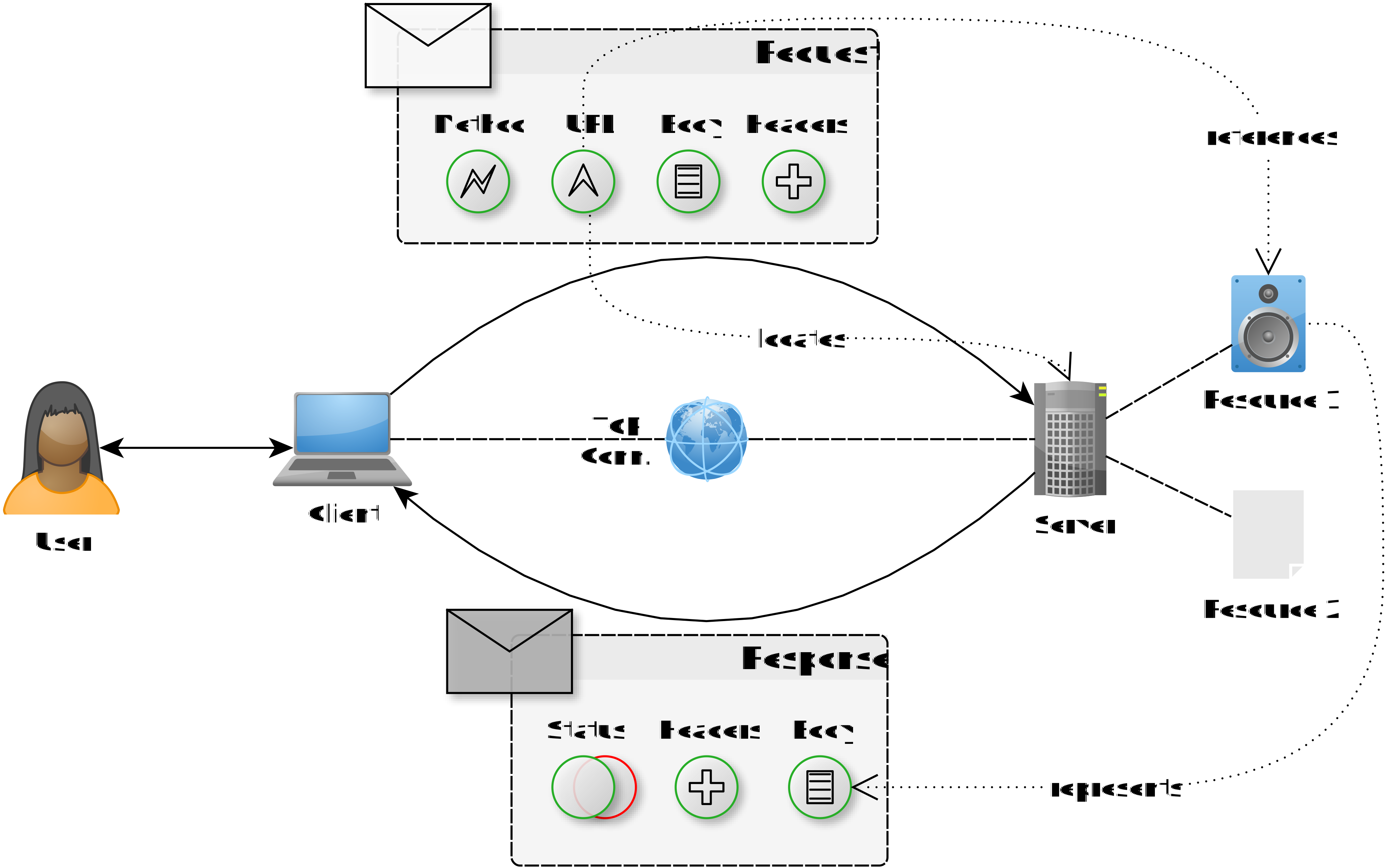
- clients acting on behalf of users or applications
- servers hosting resources or providing functionalities
- requests from client to server
- responses from server to client
- methods describing the intended operation
- status codes describing the outcome
- headers and bodies carrying metadata and content
Example of simple HTTP interaction (read)
- Client wants to remotely read volume of a speaker (id:
123), hosted by server athttps://example.com - Server allows users to read/change volume of speakers, by speaker ID, through HTTP
- To read the volume, client sends an HTTP request to URL
https://example.com/speakers/123/volume- method:
GET[“I want to read some information about the resource”] - headers:
Accept: text/html[“I want the response to be an HTML page describing the volume”]Authorization: <auth token here>[“I am authorized to access this resource, here is my token”]
- body: (empty)
- method:
- Server processes the request, reads the actual volume value, and produces a Web page describing that speaker’s volume, sending back an HTTP response
- status code:
200 OK[“The request was successful, here is the information you asked for”] - headers:
Content-Type: text/html[“The body of this response is an HTML document”]Cache-Control: no-cache[“Don’t cache this response, it may change frequently”]
- body:
<html><body><h1>Speaker 123</h1><p>Volume: 75%</p></body></html>[“Here is the HTML page describing the speaker’s volume”]
- status code:
Example of simple HTTP interaction (write)
- Client wants to remotely increase volume of a speaker (id:
123), hosted by server athttps://example.com - Server allows users to read/change volume of speakers, by speaker ID, through HTTP
- To increase the volume, client sends an HTTP request to URL
https://example.com/speakers/123/volume- method:
POST[“I want to change some information about the resource”] - headers:
Content-Type: application/json[“The body of this request is a JSON document describing the change I want to make”]Authorization: <auth token here>[“I am authorized to access this resource, here is my token”]
- body:
{"change": "+10%"}[“I want to increase the volume by 10%”]
- method:
- Server processes the request, updates the actual volume value, and sends back an HTTP response
- status code:
204 No Content[“The request was successful, but there is no content to return in the body”] - headers: (none)
- body: (empty)
- status code:
HTTP request messages
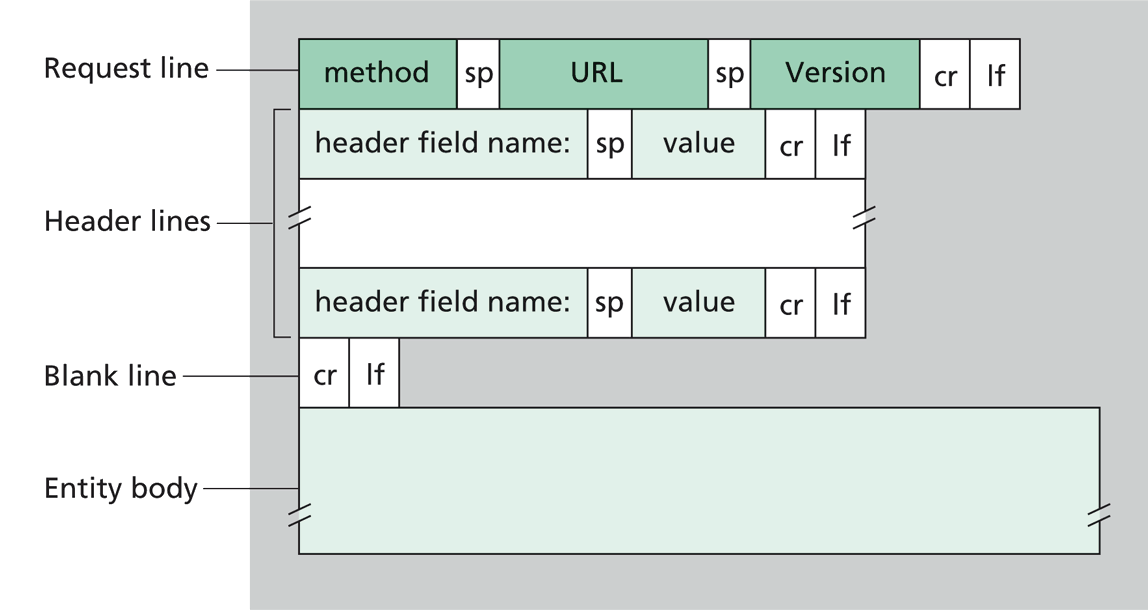
- Method: what to do on the resource (e.g., GET, POST, PUT, DELETE)
- URL: what resource to access and where (e.g., https://example.com/speakers/123/volume)
- Headers: metadata about the request (e.g., format of the body, authentication token, requested response format, etc.)
- Body: optional content sent to the server (e.g., requested changes to the resource, etc.)
- [Protocol] Version: necessary to let older and newer client/servers interoperate
HTTP response messages
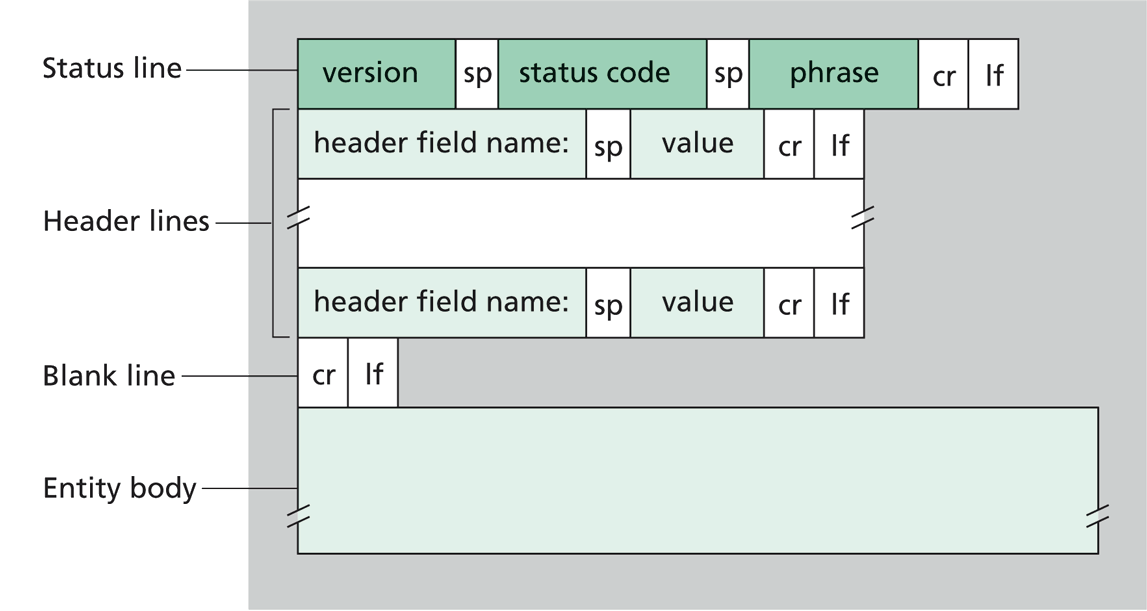
- Status code: numeric code identifying the success or failure of the request (e.g., 200, 404, 500)
- Reason phrase: human-readable description of the status code (e.g., “OK”, “Not Found”, “Internal Server Error”)
- Headers: metadata about the response (e.g., format of the body, caching directives, etc.)
- Body: optional content sent to the client (e.g., requested information, error message, etc.)
- [Protocol] Version: necessary to let older and newer client/servers interoperate
About HTTP methods
Standard set of admissible operations that clients may request on resources:
-
main ones:
GET,POST,PUT,PATCH,DELETE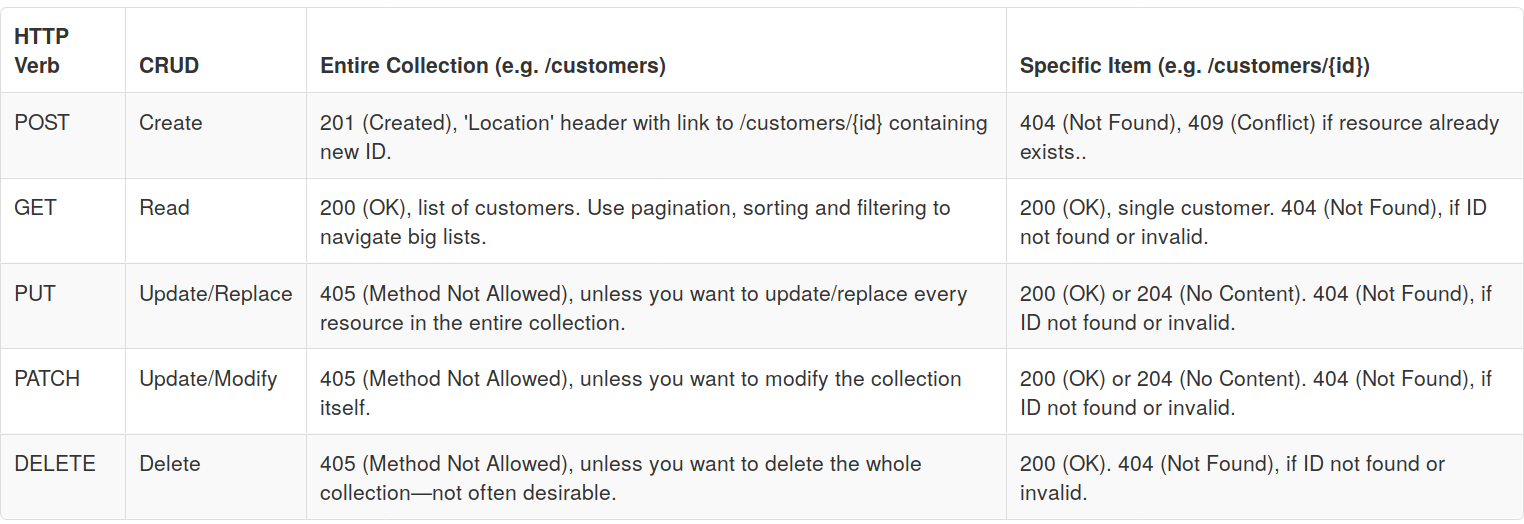
-
many more are supported, for example
HEAD,OPTIONS,CONNECT,TRACE, etc.- see https://developer.mozilla.org/docs/Web/HTTP/Methods for a complete list
About HTTP status codes
-
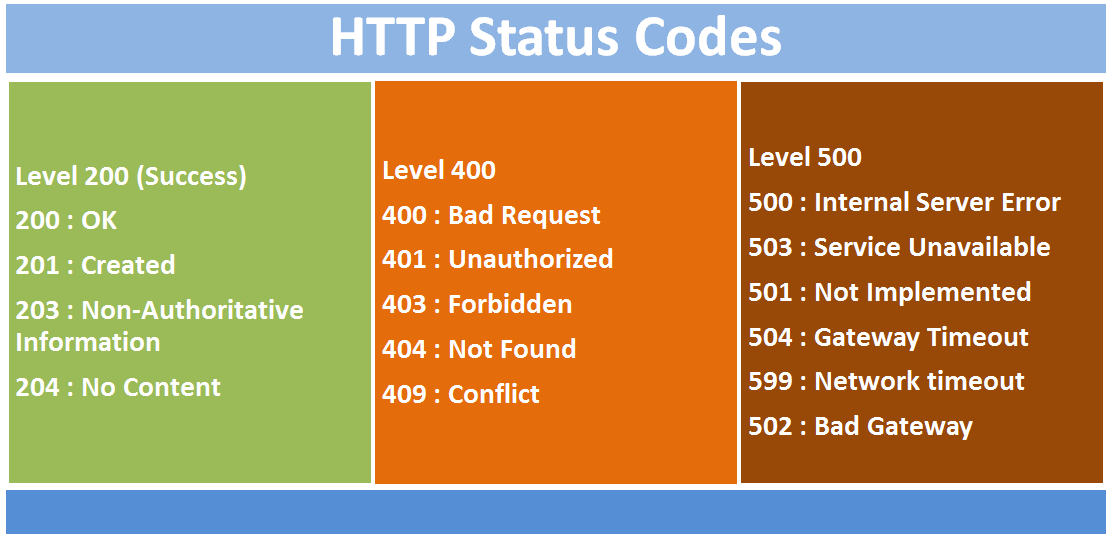
3-digit, positive integer numbers, the most significant digit identifying the class of the response:
1xx: informational responses (e.g., “time to swap to another protocol”)2xx: successful responses (e.g. “successfully processed the request with/without body being returned”)3xx: redirection messages (e.g. “the resource has moved, here is the new URL”)4xx: client-side error responses (e.g. “cannot process the request due to client’s mistake”)5xx: server-side error responses (e.g. “cannot process the request due to server’s mistake”)
-
most common status codes are in the picture:
- see https://developer.mozilla.org/docs/Web/HTTP/Status for a complete list
About HTTP headers
Key–value pairs that carry metadata about the request or response, for example:
Content-Type: specifies the media type of the body content [both in reqs and resps]Authorization: contains credentials for authenticating the client [commonly in reqs]Cache-Control: provides directives for caching mechanisms [commonly in resps]Accept: indicates the media types that the client can process [commonly in reqs]Set-Cookie: instructs the client to store a cookie [commonly in resps]User-Agent: identifies the client software making the request [commonly in reqs]Location: indicates the URL of a newly created resource or a redirection target [commonly in resps]- full list of standard headers: https://developer.mozilla.org/docs/Web/HTTP/Headers
Server designers may “invent” custom headers, but it’s best to stick to standard ones when possible for better interoperability
- custom headers should be prefixed with
X-to avoid conflicts with standard headers- but this convention is being deprecated in favor of using a custom namespace (e.g.,
MyApp-) for non-standard headers.
- but this convention is being deprecated in favor of using a custom namespace (e.g.,
About URL query parameters
-
URL query parameters (e.g.,
?page=2&sort=asc) are used to pass additional information to the server, often for filtering, sorting, or specifying options for the requested resource- most common in reading operations… (e.g.
GET /products?page=2&sort=asc) - most commonly used for collections of resources, to specify how to retrieve them (e.g. pagination, sorting, filtering, etc.)
- most common in reading operations… (e.g.
-
Syntactical aspects:
- query parameters are “whatever follows
?[and precedes#, if present] in the URL” - they are composed of
key=valuepairs, separated by&(e.g.,?key1=value1&key2=value2) - no spaces between keys and values, and special characters must be URL-encoded (e.g., space becomes
%20)- URL encoding, a.k.a. Percent-encoding, is a mechanism to encode special characters in URLs using
%followed by two hexadecimal digits representing the ASCII code of the character
- URL encoding, a.k.a. Percent-encoding, is a mechanism to encode special characters in URLs using
- query parameters are “whatever follows
-
Common query parameters include:
pagefor pagination, indicating which page of results to retrieve, assuming the server knows how to group data into pages (e.g.,?page=2)limitfor limiting the number of results returned (e.g.,?limit=10)offsetfor specifying the starting point of results (e.g.,?offset=20)sortfor sorting (e.g.,ascordesc)filterfor filtering (e.g.,?filter=price>100)searchfor search queries (e.g.,?search=keyword)- there could be other parameters, commonly containing tokens in Base64 encoding
- Better to put meta-data in the headers or in the query parameters?
- If there’s a standard header for the metadata, it’s better to use the header (e.g.,
Authorization) - If you want users to easily manipulate or copy+paste the metadata in the URL, go with query parameters (e.g.,
?query=search+term) - Otherwise go with headers, as they are more flexible and can carry more complex information without cluttering the URL
- If there’s a standard header for the metadata, it’s better to use the header (e.g.,
Content format (“type”) negotiation
Clients and servers may automatically negotiate the format of the data being exchanged
- Assumtion:
- the server may represent resources in various formats (e.g., HTML, JSON, XML, etc.)
- the client may prefer certain formats over others (e.g., a browser may prefer HTML, while an API client may prefer JSON)
- Mechanism:
- client sends an
Acceptheader listing the media types it can process, possibly with quality values (e.g.,Accept: text/html, application/json;q=0.9, */*;q=0.8) - server selects the best format it can produce based on the client’s preferences and its own capabilities
- server sends the response with the selected format and a
Content-Typeheader indicating the media type of the body (e.g.,Content-Type: application/json) - client processes the response according to the specified format
- client sends an
- “Formats” are expressed as media types (also known as MIME types), which are standardized identifiers for data formats (e.g.,
text/html,application/json,image/png, etc.)
About MIME types
-
MIME stands for “Multipurpose Internet Mail Extensions”, but it is used far beyond email to identify media types in HTTP and other protocols
-
A MIME type consists of a type and a subtype, separated by a slash (e.g.,
text/html,application/json,image/png) -
Full list is available at https://developer.mozilla.org/docs/Web/HTTP/Guides/MIME_types/Common_types
-
Most common MIME types are in the table below:
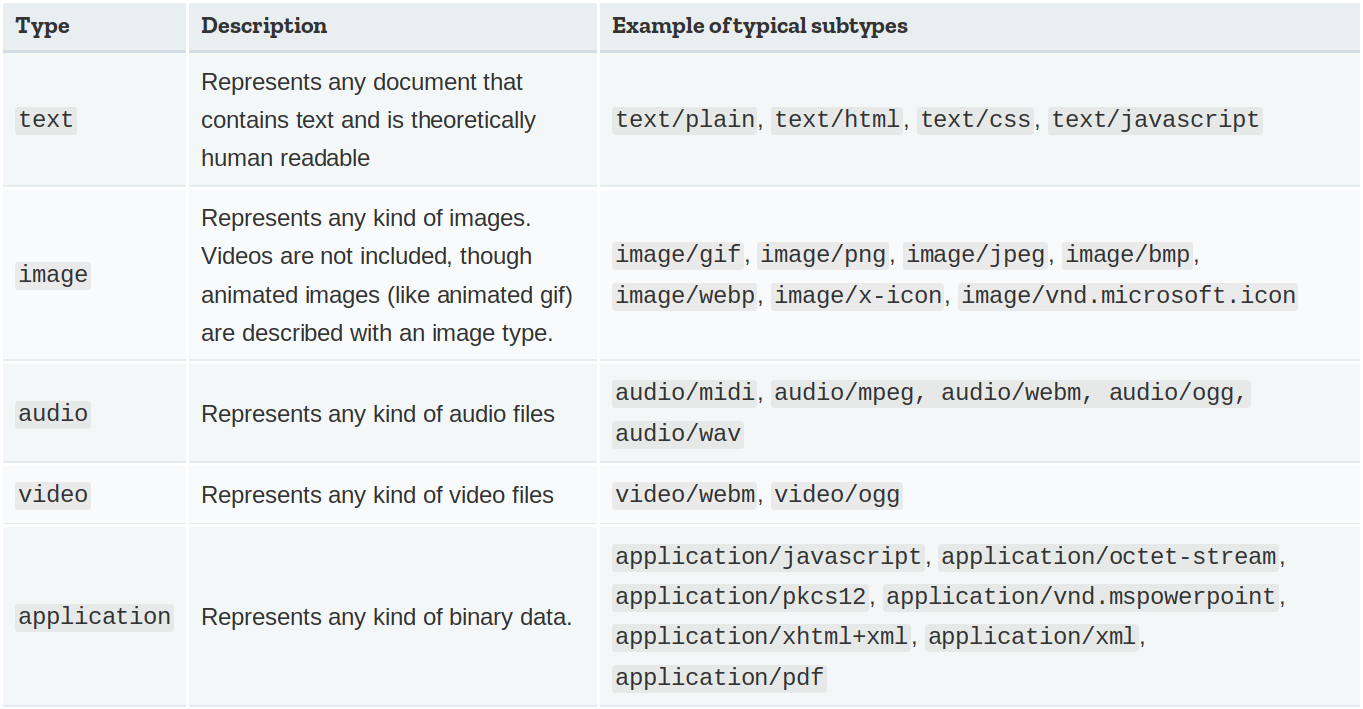
Most common Web content types (pt. 1)
-
Hypertext Markup Language (HTML):
text/html(for Web pages) should describe the content of a Web page, with no stylistic or behavioural information-
“the page” usually represents some resource (physical, digital, or virtual) that exists on the server-side, in a human-friendly way
-
it may contain links to other resources (e.g. media, other pages, scripts, etc.)
-
it may contain forms to let users interact with the server (e.g. submit data, trigger actions, etc.)
-
it may contain identifiers (e.g.
idattributes) and classes for page contents (e.g. paragraphs, buttons, etc)- so that CSS and JavaScript can refer to them for styling and behaviour purposes
-
underlying assumption is that the client knows how to render HTML pages…
- … after downloading and interpreting all the resources linked from the page (e.g. CSS, JS, media, etc.)
-
example of HTML page describing a speaker resource:
<html> <body> <h1>Speaker 123</h1> <p>Volume: 75%</p> <button id="increase-btn">Increase Volume</button> </body> </html> -
Most common Web content types (pt. 2)
-
Cascading Style Sheets (CSS):
text/css(for stylesheets) should describe the styling of a Web page, with no content or behaviour information-
it may contain rules about how to depict individual elements or groups of elements of the page (as identified by their tag, id, class, etc.)
-
these rules are interpreted by the client to determine how to render the page (e.g. colors, fonts, layout, etc.)
-
example of CSS stylesheet describing the styling of a speaker page:
/* file styles.css */ body { font-family: Arial, sans-serif; background-color: #f0f0f0; } h1 { color: #333; } p { font-size: 18px; } #increase-btn { background-color: #4CAF50; color: white; padding: 10px 20px; border: none; cursor: pointer; } #increase-btn:hover { background-color: #45a049; } -
Most common Web content types (pt. 3)
-
JavaScript (JS):
application/javascript(for scripts) should describe the behaviour of a Web page, with no content or styling information-
it may contain instructions to manipulate the content and styling of the page (e.g. by adding, removing, or changing elements, classes, attributes, etc.)
-
such instructions may be triggered by events occurring after the page has been shown to the user (e.g. button clicks, form submissions, etc.)
-
such instructions are provided by the server, along with the page, to let the client know how to “animate” the page and make it interactive
-
example of JavaScript code reloading the page when the “Increase Volume” button is clicked:
// file script.js document.getElementById('increase-btn').addEventListener('click', function() { location.reload(); }); -
Most common Web content types (pt. 4)
Wrap-up: most commonly the HTML pages contains references to the CSS and JS files that describe the styling and behaviour of the page, respectively, and the client is responsible for downloading and interpreting all these resources to render the page correctly:
<html>
    <head>
        <link rel="stylesheet" type="text/css" href="styles.css"> <!-- reference to CSS stylesheet -->
        <script src="script.js"></script>                         <!-- reference to JavaScript file -->
    </head>
    <body>
        <h1>Speaker 123</h1>
        <p>Volume: 75%</p>
        <button id="increase-btn">Increase Volume</button>
    </body>
</html>
Most common Web content types (pt. 4)
-
JavaScript Object Notation (JSON):
application/json(for data exchange) should describe the content of a resource in a machine-friendly way, with no styling or behaviour information-
it may contain structured data representing the state of a resource, or the result of an operation on a resource, etc.
-
[AJAX] sometimes the JS code may contact the server to get some tiny piece of information in JSON format, rather than the entire HTML page, in order to update the page dynamically without reloading it
-
other times, the client is not a browser, but some software component that just needs data in machine-friendly format
-
example of JSON document describing a speaker resource:
{ "id": 123, "name": "Living Room Speaker", "volume": 75, "status": "on" }- example of JavaScript code exploiting AJAX to contact the server and update the page dynamically:
document.getElementById('increase-btn').addEventListener('click', function() { // Send an AJAX request to the server to increase the volume fetch('/speakers/123/volume', { method: 'POST', headers: { 'Content-Type': 'application/json' }, body: JSON.stringify({ change: '+10%' }) }).then(response => { if (response.ok) { // If the request was successful, update the volume displayed on the page let volumeElement = document.querySelector('p'); let currentVolume = parseInt(volumeElement.textContent.split(': ')[1]); volumeElement.textContent = `Volume: ${currentVolume + 10}%`; } else { alert('Failed to increase volume'); } }); }); -
Most common Web content types (pt. 3)
-
other common formats, conceptually equivalent to JSON, include:
- eXtensible Markup Language (XML):
application/xml(for data exchange) a sort of generalization of HTML, with custom tags and no predefined semantics:
<speaker> <id>123</id> <name>Living Room Speaker</name> <volume>75</volume> <status>on</status> </speaker>- YAML Ain’t Markup Language (YAML):
application/x-yaml(for data exchange) a sort of generalization of JSON, with more human-friendly syntax (easier to read and write):
id: 123 name: Living Room Speaker volume: 75 status: on - eXtensible Markup Language (XML):
History of the Web in a nutshell
- Web 1.0: mostly static pages, read-only browsing
- Web 2.0: server-side dynamic pages, forms, template engines, user-generated content
- Web 3.0: rich clients using AJAX to talk to Web services asynchronously
- Web 4.0: single-page applications (SPAs) with highly interactive frontends
Web 1.0: static pages, read-only
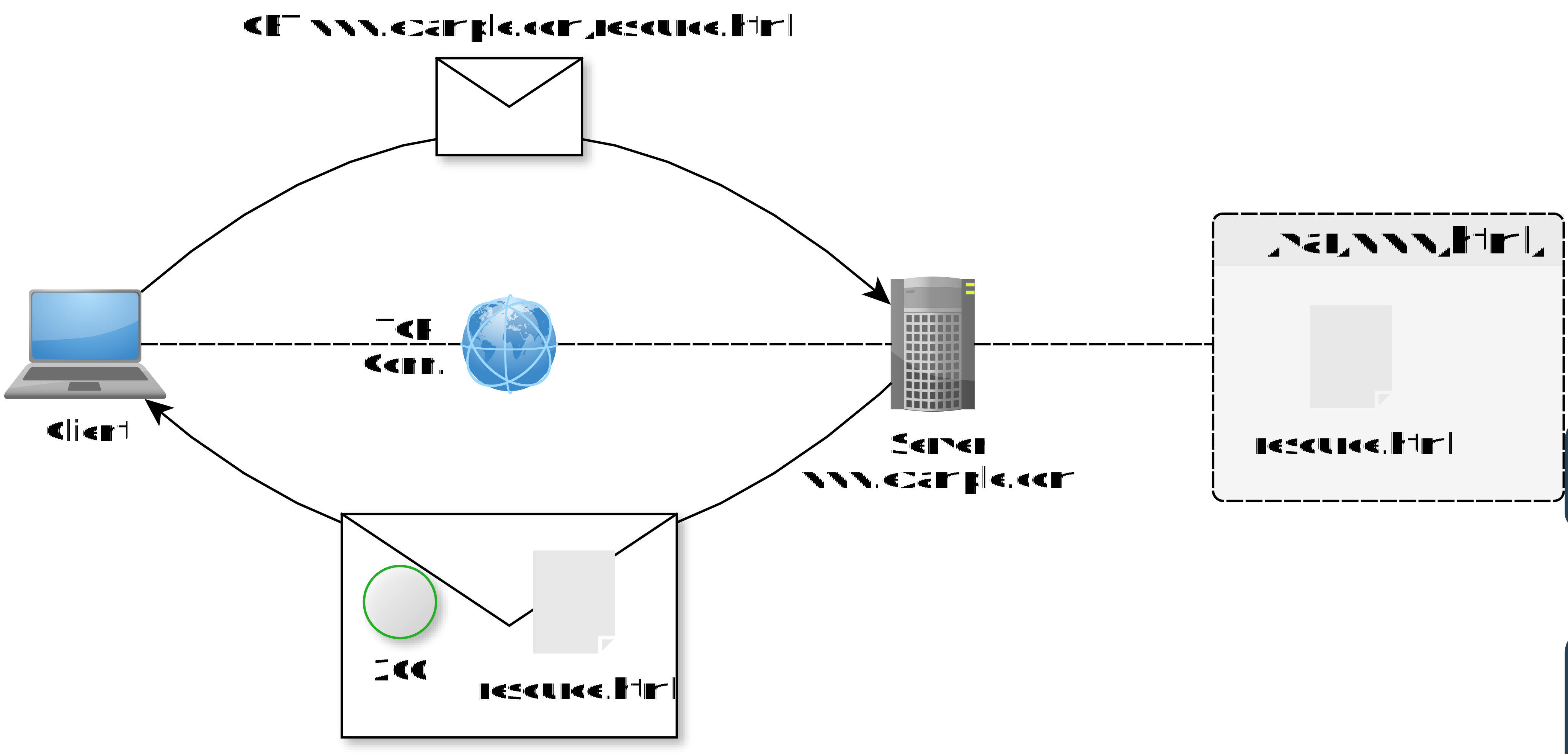
- Web Servers are essentially wrappers for folders of static files (HTML, CSS, JS, media, etc.)
- servers have a public IP address and a domain name (e.g.,
example.com) - server have a root folder (e.g.,
/var/www/html) where the static files are stored - clients may access the files by sending HTTP requests to the server, specifying the path to the file in the URL (e.g.,
https://example.com/index.html)- file paths are mapped to URL paths (e.g.,
/var/www/html/index.htmlis accessible athttps://example.com/index.html)
- file paths are mapped to URL paths (e.g.,
- servers have a public IP address and a domain name (e.g.,
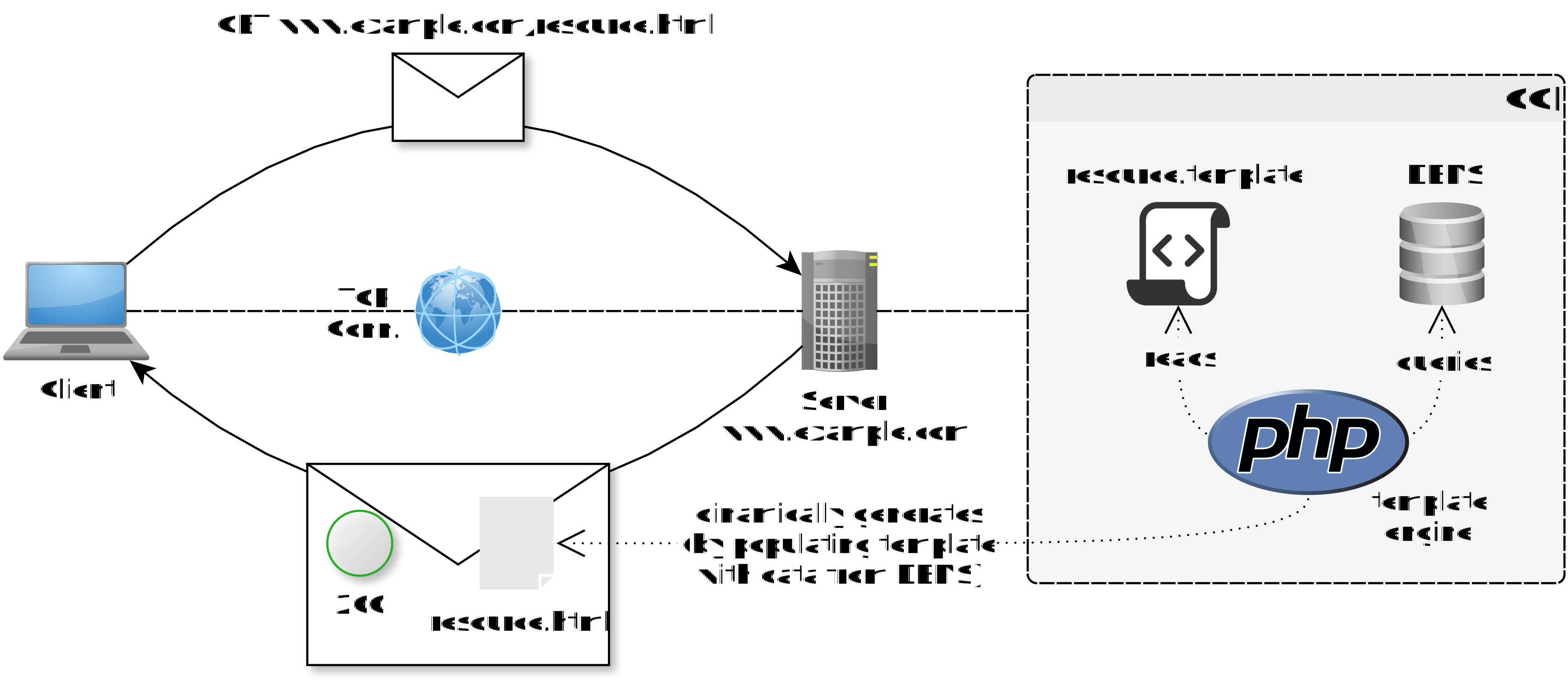
Web 2.0: dynamically generated pages + template engines (pt. 1)
- Web Servers are now able to generate dynamic pages upon request, via Common Gateway Interface (CGI), that populates HTML templates with data from databases or other sources
- PHP, JSP, ASP, etc. are examples of server-side scripting languages used for this purpose
- upon receiving an HTTP request for reading a page, the server:
- looks for the corresponding CGI script (e.g.,
index.php) - executes the script via some template engine, which may query a database or perform other operations to gather data
- the script then populates an HTML template with the gathered data and returns the generated HTML page as the HTTP response
- it is now possible for clients to access dynamic content (e.g. user-personalized pages)
- looks for the corresponding CGI script (e.g.,
- upon receiving an HTTP request for writing (e.g., form submission), the server:
- looks for the corresponding CGI script (e.g.,
submit.php) - executes the script, which processes the submitted data (e.g., by storing it in a database) and then generates an appropriate response (commonly: a redirection to the same page or another)
- it is now possible for clients to update the server-side state (e.g. by submitting forms)
- updates commonly imply reloading the entire page (which is slow for the user and inefficient for the server)
- looks for the corresponding CGI script (e.g.,
Web 2.0: dynamically generated pages + template engines (pt. 2)
-
Example of PHP script generating a dynamic page for a speaker resource:
<?php // index.php $speaker_id = $_GET['id']; // get speaker ID from query parameter // query database to get speaker information (this is just a placeholder, actual DB code would be needed) $speaker_info = getSpeakerInfoFromDatabase($speaker_id); ?> <!DOCTYPE html> <html> <head> <title>Speaker <?php echo $speaker_info['name']; ?></title> </head> <body> <h1>Speaker <?php echo $speaker_info['name']; ?></h1> <p>Volume: <?php echo $speaker_info['volume']; ?>%</p> <form action="update_volume.php" method="POST"> <input type="hidden" name="id" value="<?php echo $speaker_id; ?>"> <input type="number" name="change" value="10"> <!-- change in volume --> <button type="submit">Increase Volume</button> </form> </body> </html>- submitting a form to
update_volume.phpwould trigger a server-side script that updates the speaker’s volume in the database and then redirects back toindex.phpto show the updated information
- submitting a form to
-
Software engineering remarks:
- this approach mixes content, styling, and behaviour in a single file, which is a bad practice for maintainability and separation of concerns
- also testability is poor, as it is difficult to test input–output logic separately from its presentation, and there are no clear interfaces for unit testing
- the situation where the client is not a human-driven browser – but some automated software which just needs data in machine-friendly format (e.g., JSON) – is poorly supported by this approach, as it is primarily designed for generating human-friendly HTML pages
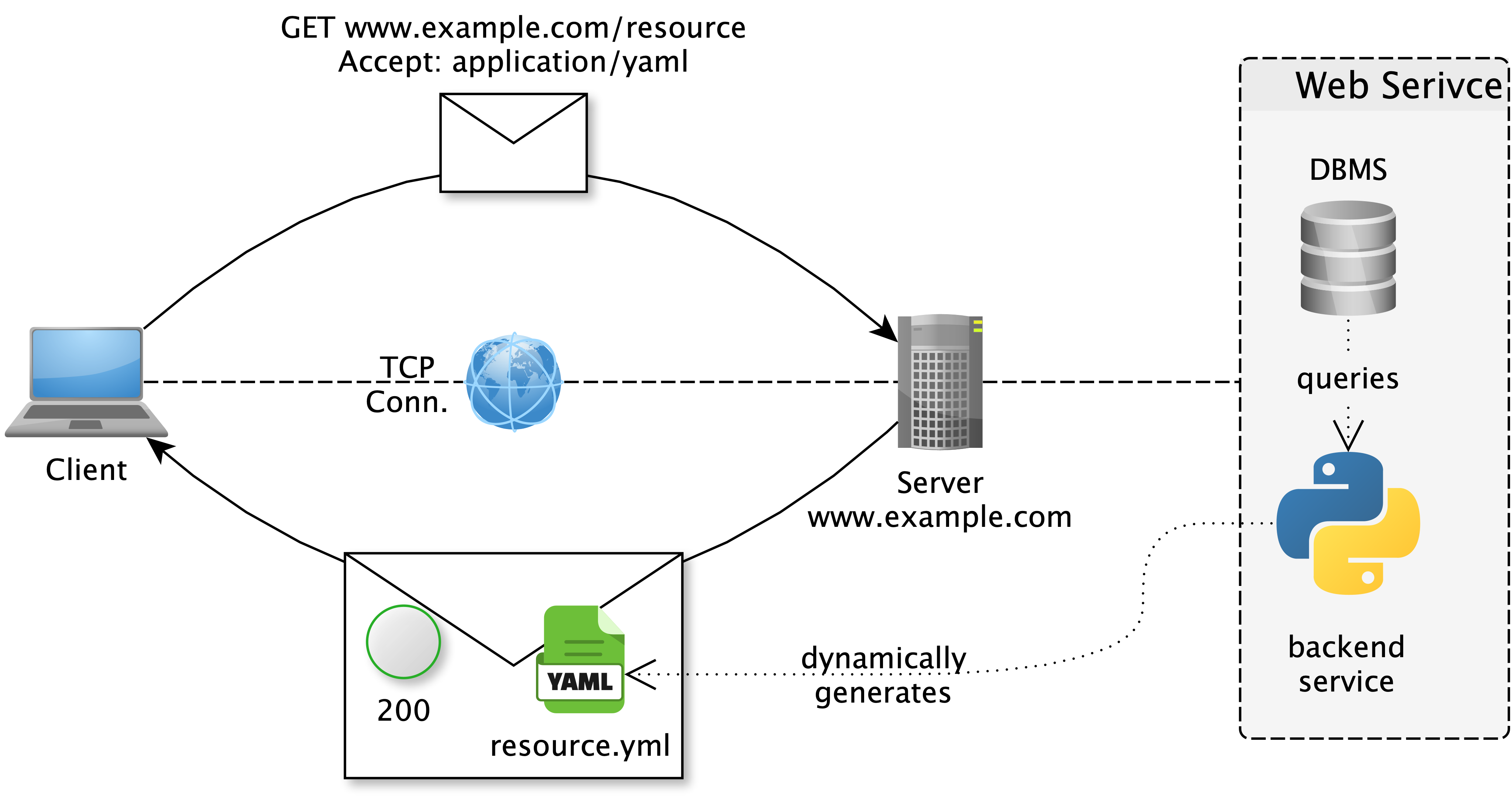
Web 3.0: dynamic pages using AJAX to contact Web Services (WS) pt. 1
Intuition 1: WS are a sort of distributed objects with an HTTP interface, letting clients send requests to produce remote operations and get remote data, without caring about the underlying implementation
Intuition 2: WS may be useful not only to allow visiting Web pages, but in general to build distributed systems where clients and servers exchange data via request–response interactions over HTTP
Intuition 3: clients may not necessarily be browsers, but also other software components (e.g., mobile apps, backend services, etc.) that need to exchange data and functionality over the Web
Web 3.0: dynamic pages using AJAX to contact Web Services (WS) pt. 2
- Web Services are software components that expose data and functionality through an HTTP interface, allowing clients to interact with them over the Web
- in a sense, they bring object-oriented programming to the Web, by letting clients interact with remote objects (resources) through a well-defined interface (API)
- they are often designed to be reusable by different clients (e.g., browsers, mobile apps, other backend services, etc.)
- they typically encapsulate some server-side logic and data, and provide programming-language-agnostic API for clients to access them
- when the client is a browser, it can use AJAX to send HTTP requests to the Web Service and update the page dynamically
- but the service supports other kinds of clients as well, not just browsers…
- … so the service commonly supports multiple content formats (e.g., HTML for browsers, JSON for API clients, etc.) and lets clients negotiate the format they prefer
Web 3.0: dynamic pages using AJAX to contact Web Services (WS) pt. 3
- Software engineering remarks:
- separation of concerns is now improved: servers may generate data in machine-friendly ways, and can be tested separately from HTML views
- engineers may now design the backend server in a reusable way: Web- and mobile-frontends, may now be designed to leverage the same WS
Web 4.0: single-page applications (SPA) pt. 1
-
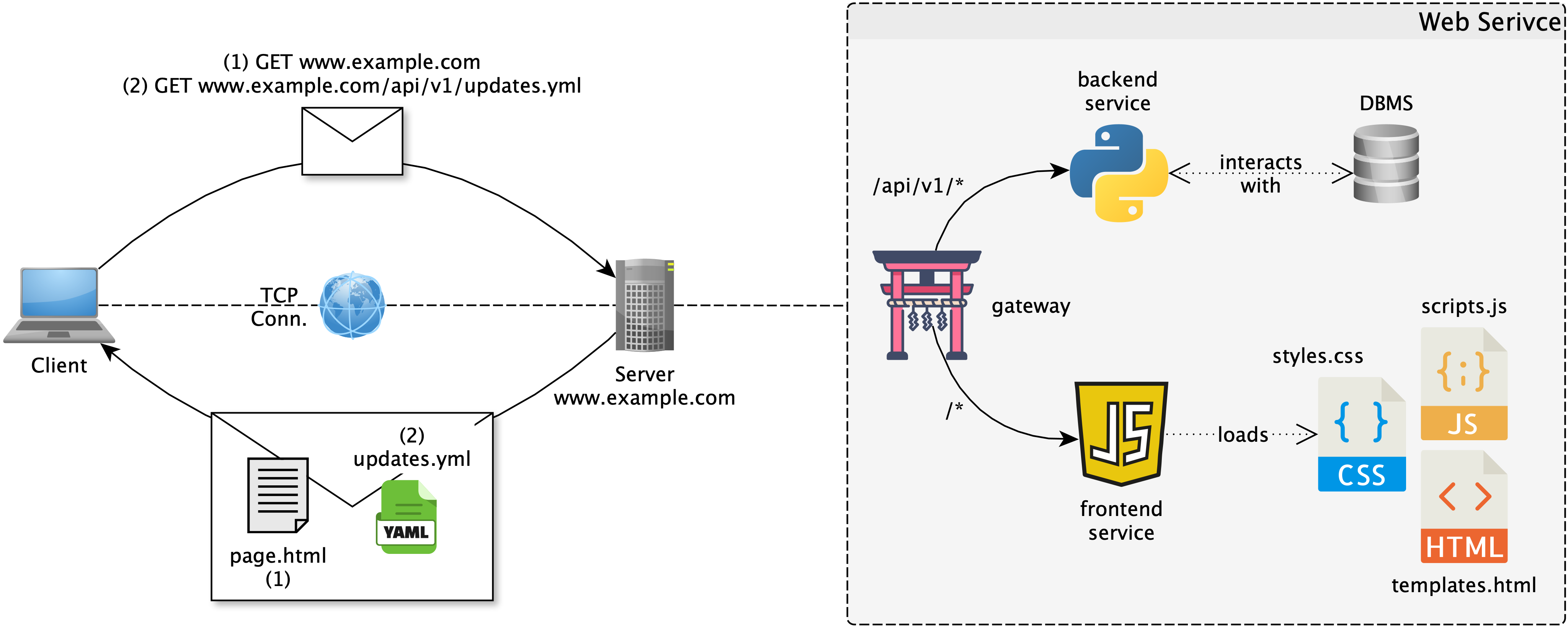
Single-page applications (SPAs) are Web applications that load a single HTML page and dynamically update it as the user interacts with the app, without reloading the entire page
- they rely heavily on JS to manage the application’s state and to communicate with backend WSs via AJAX
- they provide a more fluid and responsive user experience, as they can update only parts of the page instead of reloading everything at every update
-
On the server-side, the SPA architecture typically involves 3 components:
- a backend server that hosts WSs for data and functionalities (e.g., implemented with Flask, FastAPI, Spring Boot, etc.)
- $\approx$ encapsulating the model of a Model-View-Controller (MVC) architecture
- a frontend server that runs serves HTML, CSS, and JavaScript to the browser (e.g., implemented with React, Angular, Vue, etc.)
- $\approx$ encapsulating the view and controller of a MVC architecture
- notice that in the end, the frontend is an initially static page, which comes with JS code to update itself dynamically by contacting the backend WSs via AJAX
- an API gateway (e.g., Nginx) that makes the backend and frontend servers available to clients, as if they were a single server, by routing requests to the appropriate component based on the URL path or other criteria
- a backend server that hosts WSs for data and functionalities (e.g., implemented with Flask, FastAPI, Spring Boot, etc.)
Web Service (WS) vs. Application Programming Interface (API)
- Roughly speaking, a WS is:
- a distributed software component exposing an HTTP interface
- accessible over the network by heterogeneous clients
- designed to encapsulate data and functionality behind a stable API consisting of admissible HTTP requests and their expected responses
WS are nowadays often referred to as “APIs”. This is imprecise, as API is a more general concept.
- APIs are provided by any software component to allow other software components being written to interact with it
- if the software is object-oriented, API consist of the public methods of its classes
- if the software is a command-line application, API consist of the (sub-)commands and their parameters
- if the software is a WS, API consist of the admissible HTTP requests and their expected responses
- Some people may say that they are exploiting “APIs provided by company X”…
- … what they actually mean is that they “are writing some software which acts as the client for some WS provided by company X, and thas WS has a well-defined HTTP API that they are exploiting”
Why WS dominate distributed systems
WS have nowadays become the backbone of most distributed systems because:
-
Web metaphors and mechanisms are simple (to understand and engineer) yet very flexible and general
-
HTTP is pervasive and highly optimized, so using it for novel projects is often sufficient and convenient
-
the Web stack is programming-language- and platform-independent, so WS are enablers of interoperability and integration across heterogeneous systems
-
HTTP is widely supported and usually firewall-friendly, which usually implies less networking issues and better accessibility for clients
- and therefore less engineering effort to make the system work in real-world conditions
- (as opposed to using some custom protocol or other Internet protocols)
- and therefore less engineering effort to make the system work in real-world conditions
-
WS allow for wrapping pre-existing software so as to:
- expose legacy software on the Web (in case the legacy software was not distributed and should be made available to remote clients)
- “legacy” means “old by still operational” (and “to be changed as little as possible”)
- let heterogeneous software components interoperate (in case they are implemented in different languages or platforms, yet they need to interoperate)
- “heterogeneous” means “different in terms of programming language, platform, or other technical aspects”
- expose legacy software on the Web (in case the legacy software was not distributed and should be made available to remote clients)
The ReST architectural style
- Regardless of implementation technologies, WS can be designed according to different architectural styles
- mostly concerning the shape of the HTTP API and the default data formats
- the most common architectural style for WS is ReST (Representational State Transfer), as introduced by Roy Fielding in his PhD thesis
- Fielding’s principles have then been translated in practical guidelines, that you can find documented in many places (e.g., https://restfulapi.net)
ReST principles in a nutshell
ReST is an architertural style for hypermedia systems, which imposes the following constraints on the design of WS:
- client-server: clients consume resources, servers host them
- representation-oriented: only representations of (states of) resources are exchanged, not the resources themselves
- this is the meaning of “representational state transfer”: clients inspect and manipulate the state of resources by exchanging representation with servers
- HTML pages, JSON documents, XML documents, etc. are all examples of representations of resources
- this is the meaning of “representational state transfer”: clients inspect and manipulate the state of resources by exchanging representation with servers
- uniform interface: resources are located/identified by URLs and manipulated via standard HTTP methods
- stateless: each request contains all the information needed to process it
- cacheable: responses may marked as cacheable by servers, and clients may cache them to improve performance
- layered: proxies, gateways, and intermediaries can be inserted transparently between clients and servers
- e.g. to provide load balancing, caching, security, etc.
- code on-demand: optional transfer of executable code from servers to clients, to expand clients’ functionalities, e.g. JS
ReSTful APIs in practice (pt. 1)
ReSTful [Web] APIs are the set of HTTP requests that a WS (adhering to ReST style) is designed to accept, there including:
-
the endpoints (i.e., URLs) that identify the resources managed by the WS
- the admissible HTTP methods for each endpoint (i.e., the operations that clients can perform on the resources)
- the admissible input parameters, body formats, and headers each method may accept for each endpoint
- the expected and exceptional status codes and response formats and for each method
- the admissible input parameters, body formats, and headers each method may accept for each endpoint
- the admissible HTTP methods for each endpoint (i.e., the operations that clients can perform on the resources)
-
Designing the Web API is important, and it is commonly performed before implementing either the client or the server,
- as it defines the contract between them and guides the implementation of both sides
-
Formal languages and tools exist to help designing and documenting Web APIs
- for example the OpenAPI Specification (formerly known as Swagger),
- it allows to formally describe the API in a machine-readable format (either YAML or JSON)…
- … and then generate documentation Web pages, client/server code skeletons, etc. from it
- generated code skeletons let developers save time by providing a starting point for the implementation of the client and server, with the API contract already defined and implemented in the code structure
- for example the OpenAPI Specification (formerly known as Swagger),
-
Useful references:
- OpenAPI Specification: https://swagger.io/specification/
- “Swagger Editor”, Online editor for OpenAPI: https://editor.swagger.io/
- “SwaggerHub”, Online platform for designing, documenting, and sharing APIs: https://app.swaggerhub.com/
ReSTful APIs in practice (pt. 2)
Example (full example here, sources available here, editable via Swagger Editor):
- Endpoint:
/products[whatever precedes the path component of the URL is omitted for brevity, e.g.https://example.com]GETmethod to read the list of products- query parameters:
?category=electronics&max_price=100 - responses:
- JSON array of product objects, if status is
200 OK - JSON object with error message, if status is
400 Bad Request(e.g., if query parameters are invalid)
- JSON array of product objects, if status is
- query parameters:
POSTmethod to create a new product- body: JSON object describing the new product (e.g., name, price, category, etc.)
- responses:
201 Createdwith aLocationheader pointing to the URL of the newly created product (e.g.,https://example.com/products/123)- JSON object with error message, if status is
400 Bad Request(e.g., if body format is invalid)
- Endpoint:
/products/{id}- where
{id}is a path parameter, i.e. a placeholder for the product ID identifying a specific product by its ID GETmethod to read a specific product by its ID- responses:
- JSON object describing the product, if status is
200 OK - JSON object with error message, if status is
404 Not Found(e.g., if no product with the specified ID exists)
- JSON object describing the product, if status is
- responses:
PUTmethod to update a specific product (e.g. price, description, quantity available) by its ID- body: JSON object describing the updated product information
- responses:
204 No Contentif the update was successful (with no body in the response)- JSON object with error message, if status is
400 Bad Request(e.g., if body format is invalid) - JSON object with error message, if status is
404 Not Found(e.g., if no product with the specified ID exists)
DELETEmethod to delete a specific product by its ID- responses:
204 No Contentif the deletion was successful (with no body in the response)- JSON object with error message, if status is
404 Not Found(e.g., if no product with the specified ID exists)
- responses:
- where
ReSTful APIs in practice (pt. 3)
Badly designed APIs (1/2)
-
[BAD PRACTICE] put verbs/actions in the URL, which implies resources are not being modelled:
POST /increase_volume[“I want to increase the volume, here is the change I want to apply”]- more correct would be
POST /speakers/123/volumewith body object representing the desired change
- more correct would be
-
[BAD PRACTICE] use the same endpoint for different resources, and distinguish them by query parameters:
GET /course/view.php?id=79314(BTW this is how UniBO’s Moodle work, unfortunately…)- more correct would be
GET /courses/{academic_year}/{id_or_name}
- more correct would be
-
[BAD PRACTICE] reveal implementation details in the API design, resources names after DB tables
GET /table_users(implies that the server is using a table named “users” in its database)- more correct would be
GET /users(which is more abstract and does not reveal implementation details)
- more correct would be
-
[BAD PRACTICE] put actions in URL, and abuse meaning of HTTP methods
GET /delete_user?id=123(implies that the server is using a GET request to perform a delete operation, which is semantically incorrect and may cause issues with caching and other HTTP features)- more correct would be
DELETE /users/123(which uses the appropriate HTTP method for the intended action)
- more correct would be
ReSTful APIs in practice (pt. 3)
Badly designed APIs (2/2)
-
[BAD PRACTICE] design URLs so that they imply some stateful interactions, which is against the statelessness constraint of ReST
GET /products?page=next(implies that the server is keeping track of the client’s current page and returns the next page of products, which is not stateless and may cause issues with caching and scalability)- more correct would be
GET /products?page=2(where the client explicitly specifies the page number it wants to retrieve, making the interaction stateless)- implies the clients is responsible for keeping track of the current page and requesting the next one, which is more in line with ReST principles
- implies the server is aware of how the pagination works, but does not need to keep track of the client’s state, which is more scalable and cache-friendly
- more correct would be
-
[BAD PRACTICE] use query parameters for actions that should be represented as resources
POST /users?id=123&action=deactivate(implies that the server is using query parameters to specify an action on a resource, which is not RESTful and may lead to confusion and maintenance issues)- more correct would be
DELETE /users/123(i.e. deactivating means deleting the user resource, which is more RESTful and semantically correct) - alternatively
PUT /users/123+ body contains information about the deactivation (e.g.,{"active": false}, i.e. deactivating means updating the user resource, which is also RESTful and semantically correct)
- more correct would be
-
[BAD PRACTICE] use non-standard status codes or ignore them altogether, returning
200 OKfor all responses- more correct would be to use appropriate status codes (e.g.,
201 Createdfor successful resource creation,400 Bad Requestfor invalid input,404 Not Foundfor non-existent resources, etc.) to provide meaningful feedback to clients and leverage HTTP features effectively
- more correct would be to use appropriate status codes (e.g.,
ReSTful APIs in practice (pt. 4)
-
Most commonly, Web APIs are designed by service providers, documented, and publicly described on the Web so that developers may use them to build custom clients
-
If you’re working on the provider side, remember:
- unlikely to have some long-term benefit from keeping your APIs secret, as they will be reverse-engineered by clients anyway, so better to design them public
- well-engineered, documented, and stable APIs are a great asset for your service, as they attract more developers to use it and build on top of it, which in turn increases the value of your service
-
There are many ways to control access to APIs, which are there both for cybersecurity and business reasons
- authentication: verifying the identity of the client (e.g., via API keys, OAuth tokens, etc.)
- authorization: determining what the authenticated client is allowed to do (e.g., via role-based access control, permissions, etc.)
- rate limitation: WS may limit the number of requests per time unit, depending on user identity, role, premiumship, etc. (implies authentication)
- there is often some default per-IP-address rate limitation (preventing DoS attacks and incentivising registration/premiumship)
- monetization: WS may charge clients based on their API usage (e.g., via subscription plans, pay-per-use, etc.)
- there is often some free tier with limited usage, to let developers try the API before committing to a paid plan
-
ReST APIs are so much “de-facto standards” that many monitoring and analytics tools exist to support developers and providers
- e.g. Postman for testing APIs
- e.g. Prometheus for monitoring APIs and collecting metrics about their usage
- e.g. Graphana for visualizing metrics collected by Prometheus and other monitoring tools into management-ready dashboards
From API design to implementation Workflow
- identify resources, collections of resources, admissible operations on them, and data schemas
- (e.g., by modelling the domain with a UML class diagram, ER diagram, etc.)
- model the API, devising the OpenAPI Specification
- how: use Swagger Editor or similar tools to design the API and generate documentation and code skeletons from it
- what to do:
- identify endpoints and parametric URLs
- identify admissible HTTP operations
- identify input parameters and body formats
- optionally define relevant headers
- define response formats and status codes
- then implement (better if by exploiting the code skeletons generated via Swagger, better in 2 distinct projects) both:
- the server side with frameworks such as Flask, FastAPI, or Spring Boot
- keep it parametric (via environment variables, configuration files, etc.) w.r.t. hostnames, ports, database connections, etc.
- so that it can be easily deployed in different environments (e.g., development, staging, production, etc.)
- keep it parametric (via environment variables, configuration files, etc.) w.r.t. hostnames, ports, database connections, etc.
- the frontend side with frameworks such as React, Angular, or Vue (or bare JS+CSS+HTML)
- keep it parametric (via environment variables, configuration files, etc.) w.r.t. API endpoints (i.e. the URL of the backend WS)
- the server side with frameworks such as Flask, FastAPI, or Spring Boot
- recall to add automatic tests (to be exploited in CI pipelines) for both the server and the frontend, which may include:
- unit testing for server-side logic (e.g., with pytest, JUnit, etc.)
- possibly mocking the database and other external dependencies (e.g., with unittest.mock or similar tools)
- unit testing for frontend logic (e.g., with Jest, Mocha, etc.)
- possibly mocking the browser and the backend WS (e.g., with jsdom)
- integration testing for both clients and servers (e.g. via Docker, Kubernetes, etc.)
- possibly using tools like Postman to test the API endpoints and their expected responses
- Swagger-rendered documentation pages often come with some basic manual testing facilities, which can be a good starting point for testing the implementation
- unit testing for server-side logic (e.g., with pytest, JUnit, etc.)
- add deployment scripts (to start components orderly, e.g. DB $\rightarrow$ backend $\rightarrow$ frontend) and possibly a gateway (e.g., with Nginx) to wire components together
Example: Web3-structured WS for Anonymous QA
https://github.com/unibo-dtm-se/ws-example
Outline of relevant aspects
- Backend project structure
- API design (OpenAPI Specification)
- API implementation in Flask
- Routing and request handling
- Static files and templates
- APIs serving pages or data
- Database integration (SQLite)
- Testing with pytest
- Starting the server
- Local IPs and ports
- Accessing the API via Swagger UI, curl, etc.
- Using the UI
- Letting students play with the app
- Dataflow analysis with browser’s console and network inspector
- Discussion on testing and limited coverage
Example: Web4-structured WS for Anonymous QA
https://github.com/unibo-dtm-se/ws-example on web4.0 branch
Outline of relevant aspects
- Splitting of backend and frontend sub-projects
- Project structures (focus on JS frontend)
- What is being served by the backend and frontend servers, respectively?
- Deploment procedure
- Manual, step-by-step, via terminal commands
- Authomatic via Python script
- Manual, with backend and frontend on different computers
- Dataflow analysis with browser’s console and network inspector
- Discussion on testing and higher coverage
Check your understanding (pt. 1)
- What is the Web, and why can it be seen both as a hypermedia system and as an infrastructure for distributed systems?
- What is the difference among hyper-link, hyper-text, and hyper-media?
- What is a URL, and what are its main components?
- Why should URLs in ReSTful APIs identify resources rather than actions?
- In HTTP interactions, what roles do clients and servers play?
- What is the difference between an HTTP request and an HTTP response?
- What is the content of HTTP requests and responses? What’s their purpose?
- In practical terms, when would you choose
GETvsPOSTvsPUT/PATCHvsDELETE? - How are CRUD operations commonly mapped to HTTP methods for collections and single resources?
- What do the
1xx,2xx,3xx,4xx, and5xxstatus code classes represent?
Check your understanding (pt. 2)
- What are HTTP headers, and why are they important for interoperability?
- What is the purpose of
Accept,Content-Type,Authorization, andCache-Controlheaders? - When should metadata be put in HTTP headers instead of query parameters?
- What are URL query parameters, and what are common use cases such as pagination, sorting, and filtering?
- What is percent-encoding in URLs, and why is it needed?
- In the context of Web Services, what is content negotiation, and how do
AcceptandContent-Typecooperate in that process? - In the context of Web Services, what is a MIME type, and how is it structured?
- What are the conceptual differences among HTML, CSS, and JavaScript in Web applications?
- Why is JSON often preferred for machine-to-machine communication?
- Analogies and differences between HTTP, JSON, XML, and YAML as “languages” for the Web
- What is the difference between HTTP and HTML?
Check your understanding (pt. 3)
- How did the Web evolve from Web 1.0 to Web 4.0, and what changed in each phase?
- In Web 1.0, how were Web sites working?
- In Web 2.0, how were Web sites working?
- In Web 3.0, how are Web services working?
- In Web 4.0, how are Web apps working?
- In Web systems, how is separation among content, style, and behavior realised?
- What is a Web Service?
- What role does AJAX play in Web sites / applications?
- Why does Web 3.0 improve separation of concerns and backend reusability?
- What is a Single-Page Application (SPA), and how does it differ from page-reload-based applications?
- In a typical Single-Page Application (SPA) architecture, what are the responsibilities of backend server, frontend server, and API gateway?
- What is a Web API? How does it specializes the general concept of API?
Check your understanding (pt. 4)
- Why are Web Services dominant in distributed systems?
- What does it mean to wrap legacy software with Web Services, and why is this useful?
- What are the seven ReST constraints, and what are their implications?
- Why is the ReST architectural style called “representational state transfer”?
- In what sense does the ReST architectural style prescribe a uniform interface for resources, and what are the implications of this constraint?
- In what sense does the ReST architectural style prescribe stateless interactions, and what are the implications of this constraint?
- What should be specified when designing a ReSTful API?
- What is the role of OpenAPI Specification in Web Services design/development?
- What are most common bad practices in Web API design?
- What are authentication, authorization, rate limiting, and monetization in the context of public APIs?
- From API design to implementation, what are the main engineering steps from domain modeling to tests and deployment?
Lecture is Over
Compiled on: 2026-07-31 — printable version